
When I saw “Extra Properties” as part of the changes that were made in PrestaShop 9.2, I felt like a lot of other business owners might feel at first: after all those years of wishing there was a native solution for adding custom properties, my wishes were answered without using any sort of paid add-ons. I downloaded the PrestaShop 9.2.0 Classic Edition (6.0-beta.1) release and began testing the functionality of the feature.
The real question that I wanted to resolve was that which is of primary importance for store owners can I use it to add a field on my product page that a client can fill in, such as a gift message or inscription, without purchasing any module? So I looked into the src/Core/ExtraProperty code and tested it myself, and here is what I discovered.
Short answer: not with Extra Properties. Not because it’s a bad feature, but because it deals with a completely different task that the merchant does not usually associate with custom fields. This is what I found out after researching the code myself and trying it, and where PrestaShop’s own native Customization feature and the dedicated module from Knowband still prove useful.
What About Native Customisation?
Before going further, it’s worth checking whether PrestaShop already had a native answer to my original question, separate from Extra Properties entirely. It does. PrestaShop has long had a Customization feature: per-product fields that a shopper actually fills in on the product page, with the submitted value carried through the cart and into the order. That is the real native answer to “can a customer type a gift message or an engraving request,” not Extra Properties.
Reading the 9.2 source confirms it’s still fully wired in, not legacy code left over from an older version. classes/Customization.php and classes/CustomizationField.php are both present, alongside a full Symfony command and handler stack under src/Adapter/Product/Customization/ (SetProductCustomizationFieldsHandler, ProductCustomizationFieldUpdater, CustomizationFieldValidator, and more) plus a matching cart-side handler, AddCustomizationHandler.php. That is active, modern plumbing, not something PrestaShop forgot to remove.
The limitation is the field type. The value object which is the type of the customization field, which is named “CustomizationFieldType,” has only two constants: TYPE_FILE and TYPE_TEXT. There is no selection, radio button, check box, or date type provided; there is also no validation other than required/optional; no field targeting other than for the current product.For a plain text box or a single file upload, native Customization already does the job for free, no module needed. For anything richer, select options, conditional fields, category-wide reuse, PrestaShop’s native tools stop right where the Knowband module picks up.
So the honest three-way answer to my original question is this. For a plain text or single file field, native Customization already does it, no purchase needed. For an admin and API data layer with no storefront input at all, that is what Extra Properties is for. For a richer, multi-type, targeted product-page input field, that is the specific gap the Knowband module fills. I have not tested the native Customization creation flow live in this install, this section is based on reading the source, so treat the field-type limit as source-confirmed rather than click-tested.
What I Found When I Looked at Extra Properties
The feature lives under Configure › Advanced Parameters › Extra Properties, and once I started reading through it, I could tell it’s genuinely solid core infrastructure. The effect that it has is that you can link a field containing typed data to just about any entity within PrestaShop be it a product, a customer, a category without having to make changes in the override file. I have made my share of overrides just so that I could add another column to an entity. Create one field, and PrestaShop automatically saves this in its own table linked to the entity, with separate tables for data depending on the language and shop, so multilingual and multi-shop configurations are automatically taken care of.
The Extra property definitions list under Advanced Parameters → Extra Properties, with the warranty_note test property already registered.
Going through ExtraPropertyType.php, I saw that there are eight field types supported: integer, boolean, string, float, date, HTML, JSON, and choice. There’s also a set of whitelisted validation rules in ExtraPropertyConstraintCatalog.php: length limits, ranges, regex patterns, and allowed choices pulled from Symfony’s validation constraints. One thing I liked: modules can register their own fields programmatically through Module::registerExtraProperty() (confirmed in classes/module/Module.php in the core), and the rule is that any property a module registers that way shows up read-only for a merchant in the admin UI: visible, but not editable or deletable from the Back Office. That’s a real improvement if you’ve ever maintained an override file just to expose extra data on a core entity.
The Field definition card on the New extra property form, showing Entity name, Property name, and the Field type dropdown.
Nevertheless, giving credit where it’s due, this is an extension that doesn’t rely on overriding, which makes it a valuable contribution to the PrestaShop ecosystem. Additionally, I have noticed that it’s still in the beta phase when working with the PrestaShop 9.2.0 Classic Edition (6.0-beta.1).
Where It Fell Apart for Product Personalisation
This is where I started running into walls, and it didn’t take long.
There’s no customer-facing input anywhere. I looked for it. Extra Properties can be read from and written to back-office forms, the Admin API, or module code that’s the entire surface. There’s no HTML form on the storefront where a shopper types anything into one of these fields. It wasn’t built to be a checkout-facing or product-page-facing input tool; it’s an admin/API data layer, full stop.
Nothing shows up unless you go configure it. I created a test field on the product entity, warranty_note, and left the placement unconfigured, the way I’d guess a lot of admins might do on a first attempt, assuming the field would just appear somewhere sensible. It didn’t. I went to the product edit page, searched the entire rendered page source for the field name, and got zero matches. No message and no error; it was simply not present. This is not a bug, but the design of the feature. However, there is a very clear discrepancy between “I created this property” and “I can view it anywhere,” which I encountered firsthand right away.
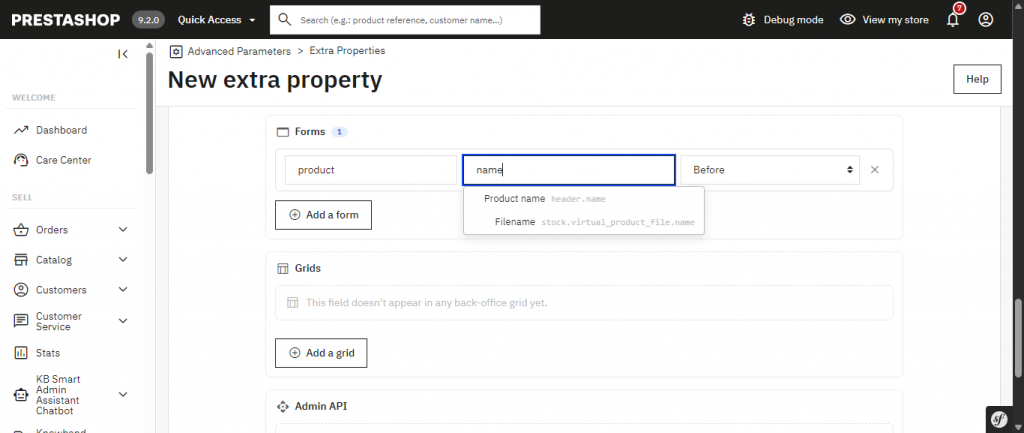
That gap gets worse the moment you actually try to configure Placement, and not in the way I expected. This is a different state from the property in the earlier test above, since that one had no Forms, Grids, or Admin API entries at all. Here I added a Forms entry for warranty_note pointing at the product form (entity product). The anchor field turned out to have a live autocomplete of its own: as I typed name, it suggested Product name, header. name, pulled straight from the real form schema.
I ignored the suggestion and saved name anyway, exactly the kind of value the field’s own label makes you assume is right. Saving the property itself succeeded without any error. It was only when I opened a product edit page afterwards that PrestaShop tried to inject the field and threw an uncaught InvalidArgumentException, raised by PrestaShopBundle’s FormBuilderModifier class, taking down every product edit page in the Back Office with an HTTP 500: “Form field “name” does not exist in “product” form.”
I only saw that exact message because debug mode was switched on for this test install. On a production store with debug mode off, a merchant would just see a generic error page, with the real cause visible only in the Symfony logs under var/logs. I tested this on the product edit screen specifically; I did not check whether product creation, duplication, the product grid, or the Admin API break the same way.
Typing “name” into the Forms anchor path field surfaces a live autocomplete suggestion pulled from the real form schema: Product name → header.name.
Saving the anchor as the literal “name” instead of the suggested header.name: every product edit page now throws an uncaught InvalidArgumentException (HTTP 500).
After correcting the anchor to header.name with Position “Before”: the field appears exactly where requested, right above Product name in the page header.
Fixing it took two steps. Back in Advanced Parameters, Extra Properties, I opened the property and corrected the anchor path to the value the autocomplete had actually suggested, header.name, then saved and reopened the product edit page to confirm it loaded normally again. The field then appeared exactly where requested, right above Product name in the page header. If a Forms entry is left on the default position, Automatic, instead of anchored to a specific field, PrestaShop drops the value into a fallback “Extra fields” tab instead of trying to inject it inline, which is a safer default and would have avoided this particular crash. That is a different state again from leaving Placement completely empty, which is what produced the silent no-show in the first test earlier in this article. So the tool clearly has the correct schema and shows it to you as you type.It will not prevent you from going beyond the suggested point, and then, the mismatch goes unnoticed until a whole different and unrelated screen, each and every Product Edit page, crashes due to that issue. Should clearing the page and refreshing not solve the problem, try clearing the Symfony cache (var/cache/prod and var/cache/dev or Performance tab under Advanced Parameters), since in the case where the placement is fixed, the cached version of the form can still throw this error due to outdated compilation. And if the invalid property was added by the module instead of being created in the Back Office, then, according to the rule mentioned above, all its Forms and Grids fields become read-only for a merchant, which means that there is no way to solve the problem without coding except disabling or uninstalling that module.
The storefront side is thinner than the UI suggests. Every Extra Property definition has a “Display in front-office” checkbox, which had me expecting some kind of automatic rendering. In plain terms, checking it only makes the value available to front-office presenters, meaning PHP and Smarty can read it. It does not render anything on its own. So I searched every .tpl file across every theme shipped with PS 9.2, and found zero references to extra_properties anywhere. Nothing renders it. In order for a value to appear on the frontend at all, it would have to be added manually, preferably using a child theme or a little module that hooks into the displayProductAdditionalInfo function, as opposed to editing the theme manually after receiving it.
The actual template variable syntax is fairly straightforward, {$product.extra_properties.mymodule.myfield}, where mymodule is the technical name of the module that owns the field.
For one created in the Back Office instead, like warranty_note in this article, there is no owning module, and the code confirms the namespace key PrestaShop uses for that case is the literal string _core, so the real access pattern for that specific example is {$product.extra_properties._core.warranty_note}. Either way, even after adding that, it is read-only display. Still no field a customer can fill in. The safer alternative here makes sure that the value exists and is not empty before displaying it, such as {if isset($product.extra_properties.mymodule.myfield) && $product.extra_properties.mymodule.myfield !== ”}{$product.extra_properties.mymodule.myfield}{/if} because the less cautious approach will still call the non-existent property or a hidden one, which may result in a blank value being printed or a PHP notice depending on how you have configured your Smarty error reporting options, and will additionally mask any actual value of 0. The final point to note: if your property Field type is set to Rich text (HTML) and you use the nofilter modifier to display the value, do keep in mind that anyone who can update the property, either directly or using Admin API, will be able to inject arbitrary HTML/script into your storefront.A few other things I ran into while poking around:
- No file-upload field type exists at all, so ID uploads or artwork uploads are off the table.
- A property applies to the whole entity I couldn’t find any way to scope one to specific products, categories, or manufacturers.
- I didn’t find any hook into the cart, checkout, or PrestaShop’s Customisation feature; a property value just doesn’t get captured as part of an order, at least not in the PrestaShop 9.2.0 Classic Edition (6.0-beta.1) build I tested.
- Nothing renders it automatically on the order confirmation, the invoice, or the admin order detail tab either.
And setting one up isn’t a five-minute job for a non-developer. The creation form has five separate cards: field definition, visibility, labels, validation, and placement. Placement itself is more sophisticated than it first looks: the form id, grid id, and even the anchor path field are all backed by a live autocomplete pulled from the real schema, the same one that correctly suggested header.name for the product form’s name field above. The actual gap isn’t missing data; it’s missing enforcement.
Nothing stops you from typing past the suggestion and saving a value it never offered, and when that happens, the failure doesn’t surface on this screen at all; it surfaces as a crash on an unrelated page later. I was comfortable navigating it because I already knew what I was looking for in the code. I don’t think a store owner without dev experience would necessarily notice the suggestion dropdown, let alone connect a crash on the product page back to a typo made here, possibly days later, and I’d actively recommend always picking a placement value from the dropdown rather than typing one from memory.
The Forms placement’s form id field also has a live autocomplete listing every valid back-office form. The gap is enforcement on the anchor path field, not missing data here.
None of this makes Extra Properties a failure. It’s doing exactly what override-free entity extension is supposed to do. It just isn’t the tool for customer-facing product personalization, and after actually testing it, I don’t think PrestaShop is claiming it is either.
Beyond product customisation, PrestaShop store owners may also be exploring AI-powered tools for store management. If you’re comparing the available options, read our guide to PrestaShop 9.2 Ask AI vs. Smart AI Admin Assistant to understand how these solutions differ and which may better suit your workflow.
What I Used Instead: Knowband’s Product Custom Field Module
Since Extra Properties couldn’t get me a customer-facing product field, I went back to a module I’d worked with before, Knowband’s product-page custom field module, officially listed as “Advance Product Attribute/Field” (kbproductfield, v1.1.4), to check what it actually covers, since this is the narrower, more specific job it’s built for. I’ll keep calling it “the Product Custom Field module” through the rest of this article for readability, but that is a description, not its storefront listing name.
Where Extra Properties stopped at admin-only data, this module renders a real HTML input directly on the storefront product page out of the box, through a standard product-page hook. It gives you seven field types that cover what merchants usually ask customers for: text, textarea, select, radio, checkbox, date, and file upload. The file upload option alone is something I couldn’t find anywhere in Extra Properties.
File upload is a real capability here, and a real responsibility. Before turning it on for something sensitive like an ID upload, confirm the module validates the MIME type and extension server-side and not just in the browser, blocks executable file types, enforces a size limit, and stores uploads outside the web root (or otherwise blocks direct access) with non-guessable filenames. Identity documents and similar uploads are also personal data under GDPR, so check the module’s retention and deletion behaviour, including whether it plugs into PrestaShop’s own GDPR export and delete hooks, before collecting them. I have not audited the module’s upload-handling code myself, so treat this as a checklist to verify, not a claim that it fails any of it.
I also checked how it validates input. Client-side, the module ships dedicated validation scripts that reference the same email, phone, and name-style checks PrestaShop uses natively, plus configurable min and max length and a required or optional toggle per field. On the admin side, the field definitions themselves are validated with PrestaShop’s native Validate::isGenericName(). What I could not confirm by reading the code is full native server-side validation of the actual answers a customer submits: the front controller that receives them mainly checks that required fields are not empty, rather than re-running format-specific native validators on the submitted values. Treat “validated server-side with PrestaShop’s native validators” as a claim worth confirming yourself before relying on it for anything sensitive.
The part that actually matters once a customer submits something is what happens next, and this is where the module does real work I’d otherwise have to build myself. Reading the Cart.php override, the mechanism is concrete, not just “token-based” in the abstract: submitted values are packed into a hash keyed by id_cart plus id_product plus id_product_attribute, stored in the module’s own kb_product_cart_hash table, and decoded again whenever the cart is rendered so the label and value can be attached to that line. From there it rides PrestaShop’s normal order-placement flow into the order and the admin order tab, and into the PDF invoice through the module’s own displayPDFInvoice hook. One gap I confirmed by checking the module’s registered hooks: there is no hook for the order confirmation page or order-history emails, only the cart, the admin order tab, and the invoice, which matches what I ran into later when I went looking for that specific touchpoint.
Targeting is also a lot more granular than “the whole entity,” which was one of the first limitations I ran into with Extra Properties. Here, a field can be global, or scoped to a specific product, a category, a manufacturer, a supplier, or an explicit include/exclude product list. It’s multilingual too labels, descriptions, placeholders, option values, and error messages can all be set per language.
Setup, from my own experience with it, is a back-office point-and-click flow: install, add a field, pick where it shows, done. No SQL, no table names, no Symfony form-type knowledge a very different experience from what I went through configuring Extra Properties.
What I Actually Compared, Side by Side
| Capability | Extra Properties, PrestaShop 9.2.0 Classic Edition (6.0-beta.1) | Knowband Product Custom Field |
|---|---|---|
| Customer-facing input on product page | No — Admin/API only | Yes — Out of the box |
| Renders automatically | Back office: yes, via Automatic placement (a fallback tab). Storefront: no. | Yes |
| File upload field type | Not available | Yes |
| Product/category/manufacturer targeting | No, whole entity only | Yes — Granular targeting |
| Cart → order → invoice capture | Not built in | Yes — Automatic |
| Setup skill required | Developer-familiar (form IDs and anchor paths, no SQL involved) | Point-and-click, no code |
| Multi-shop / multi-language | Yes — Native | Yes |
| Status | Beta (6.0-beta.1) | Stable release (v1.1.4) |
Where I’d Push Back on Both Sides
To be fair to Extra Properties: it does one thing the Knowband module doesn’t try to do. It works across essentially any entity customers, categories, and in principle any other entity backed by a real table, not just products. I did not specifically test CMS pages myself, but nothing in the Extra Properties code appeared to restrict it. If what you actually need is internal data attached to a customer record, Extra Properties is the right, native tool for that, and I wouldn’t reach for a product-specific module to solve it.
The Knowband module isn’t perfect either, and I want to be upfront about that rather than gloss over it. It’s scoped to products only I couldn’t extend it to customers, categories, or other entities the way Extra Properties can. It also ships two core class overrides (Cart.php and Product.php) to wire the cart-to-order data flow, which is a legitimate upgrade-compatibility trade-off compared to Extra Properties’ override-free storage model.
That’s the honest framing: the module fully solves the problem I actually had today, at the cost of a couple of overrides that a more mature core-native equivalent might eventually avoid. I also found one template gap ,order-history and order-confirmation emails don’t display the submitted values, only the cart, the PDF invoice, and the admin order tab do which is worth knowing if that specific touchpoint matters to you.
Installing a module that ships core overrides is not a zero-risk, few-minutes operation on a production store, whatever the setup flow feels like. Before installing on anything that matters: take a full backup of the files and database, install on staging first, check override/classes/ for conflicts with any other module that overrides Cart or Product, clear the cache, and run the full product-to-invoice flow end to end before trusting it.
Two things worth knowing specifically: the “Disable all overrides” switch in Advanced Parameters, Performance will silently turn off the module’s cart-to-order flow, and every core upgrade deserves a regression test of that same flow, since an upgrade can touch the exact methods this module overrides.
PrestaShop 9.2 introduces changes across different areas of store management and customer experience. For example, store owners exploring checkout improvements can also read about PrestaShop 9.2 One Page Checkout to learn more about simplifying the checkout process.
What I’d Actually Recommend
After going through both, here’s where I landed: if what you’re after is a real product-page field that a customer fills in, and you want that answer to survive all the way to the invoice, Extra Properties in its current PrestaShop 9.2.0 Classic Edition (6.0-beta.1) form doesn’t get you there there’s no configuration path around it, because the customer-facing input widget just isn’t part of the feature.
Knowband’s Product Custom Field module got me there on day one: install, add a field, pick where it shows, and I had a working product-page input with full cart-to-invoice tracking in a few minutes no development time needed.
If that’s the problem you’re trying to solve, see Knowband Product Custom Field for setup details and pricing.

