
PrestaShop 9.2 is currently in Beta, with the stable release expected in early 2027. Before upgrading, store owners will need to make sure their hosting environment supports PHP 8.1 or higher.
The Native One Page Checkout is one of the key changes we’ll be looking at in this article. We’ll go through what the new checkout offers and how it compares with a dedicated checkout solution.
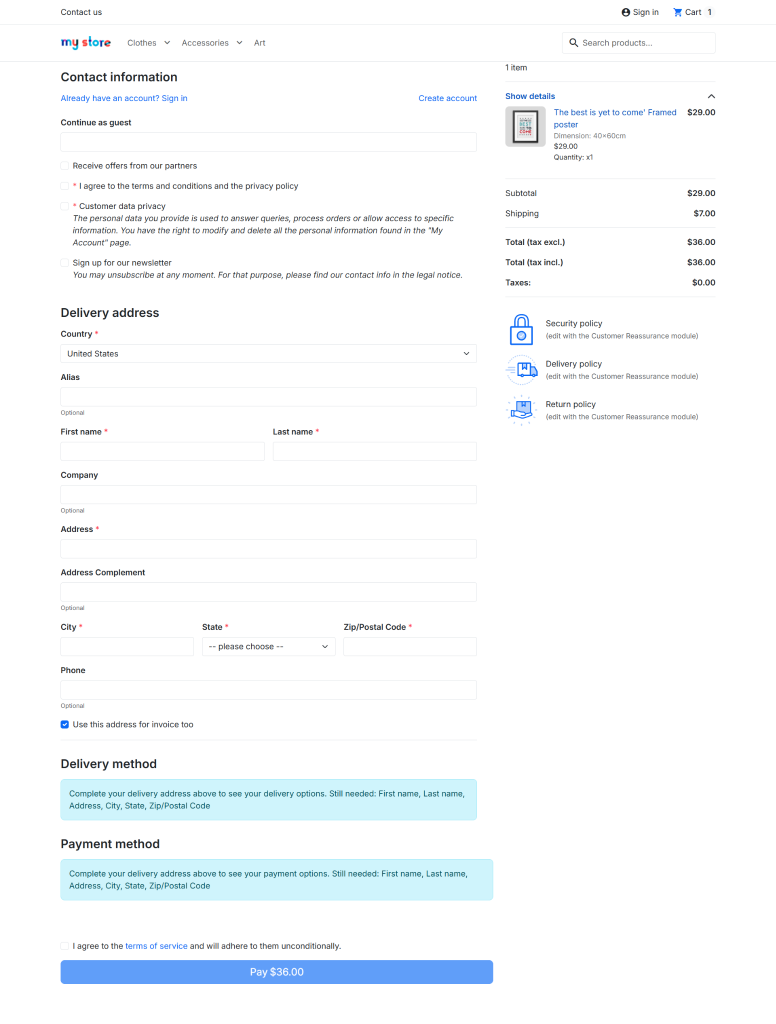
The native PrestaShop One Page Checkout provides merchants with a basic framework to consolidate checkout procedures into a single page.
The native one-page checkout is not mandatory, and merchants can still use the traditional checkout procedure if they want to
Knowband SuperCheckout takes a broader approach. Along with the one-page checkout itself, it includes features aimed at the practical issues merchants deal with around checkout, such as social login, guest registration, custom fields, address autocomplete, abandoned cart information, shipping and payment controls, and checkout customisation.
So, the comparison is not really about which one has a one-page checkout. Both do. The more useful question is what else do you need your checkout to handle?
That’s what we’ll look at in the rest of this article: what PrestaShop 9.2’s native One Page Checkout brings to the table, what Knowband SuperCheckout adds on top of the basic checkout experience, and where the differences matter for a real store.
1. Native One-Page Checkout vs Knowband SuperCheckout
See how PrestaShop 9.2’s native One-Page Checkout compares with the additional checkout features available in Knowband SuperCheckout.
| Feature | Native One-Page Checkout | Knowband SuperCheckout |
|---|---|---|
| PrestaShop version support | 9.2 | 1.7.x to 9.x.x |
| Payment & carrier modules | ✓ Standard hooks and JS events | ✓ Compatible with 150+ payment modules, including Stripe and PayPal |
| Social login | Not Available | ✓ Facebook, Google and PayPal |
| Guest checkout | ✓ Guest checkout | ✓ Guest checkout with auto-registration |
| Custom checkout fields | Not Available | ✓ Text, textarea, radio, checkbox, date, file and dropdown fields |
| Abandoned cart analytics | Not Available | ✓ Revenue, conversion and checkout drop-off reports |
| Address autofill | Not Available | ✓ IP-based country detection and Google Places |
| Ship2Pay | Not Available | ✓ Link payment methods with selected shipping methods |
| Email marketing | Not Available | ✓ Mailchimp, Klaviyo and SendinBlue |
| Layout customization | Not Available | ✓ Drag-and-drop layout with custom CSS/JS |
| Spain CIF/DNI/NIF validation | Not Available | ✓ Country-specific validation |
Note: PrestaShop 9.2 is currently in Beta. Compatibility and features may change before the stable release.
What PrestaShop One Page Checkout Actually Is
According to PrestaShop’s developer documentation for the 9.2 Beta, the PrestaShop One Page Checkout exists to solve one problem: to give the platform a proper structure for single‑page checkout. In detail, that means:
- A new hook, actionCheckoutBuildProcess, gives modules “a reliable entry point into the checkout build process” instead of forcing them to override the whole controller. The module also uses the existing displayOverrideTemplate hook, which is not new to 9.2, to swap in its own checkout template when one-page checkout is enabled.
- Existing payment and carrier hooks carried over into the new flow wherever possible, specifically so developers aren’t redoing integration work from scratch.
- A JS event system (opcCarriersUpdated, opcPaymentMethodSelected, opcDeliveryAddressSelected) for handling redirect-based payment methods and address changes without a full page reload.
Strip away the technical language, and the point is simple: PrestaShop wants payment and carrier modules to plug into the new checkout the same way they always have, without every developer rewriting a template override. That’s genuinely useful if you’re maintaining a store running a dozen payment modules. Fewer overrides means fewer things breaking at upgrade time.
What it doesn’t handle is everything outside the checkout mechanics: social login, guest registration, address autofill, analytics, marketing integrations. None of that falls under this module’s responsibility and the documentation does not indicate any changes to that before the release.
That’s really the point in the comparison. It was never just “does it fit on one page.” It’s “what else comes with it.”
3.0 Beyond One Page: What Knowband SuperCheckout Does for Your Store
A single-page layout is the easy part. What actually matters is everything configured around it, and how well that fits into how the store already runs. Here’s what that looks like in practice.
3.1 Custom Fields: Capture the Information You Need at Checkout
SuperCheckout’s field builder lets you drop a text field, text area field, radio field, checkbox field, date picker, file upload, or dropdown into checkout. No template edits required. A B2B store might use it for a VAT number. Another store might need it for delivery instructions, a gift message, or a preferred delivery slot.
The information entered by the customer is saved with the order, so the person handling the order can see it when needed. This is much easier than having the information buried in a notes field.
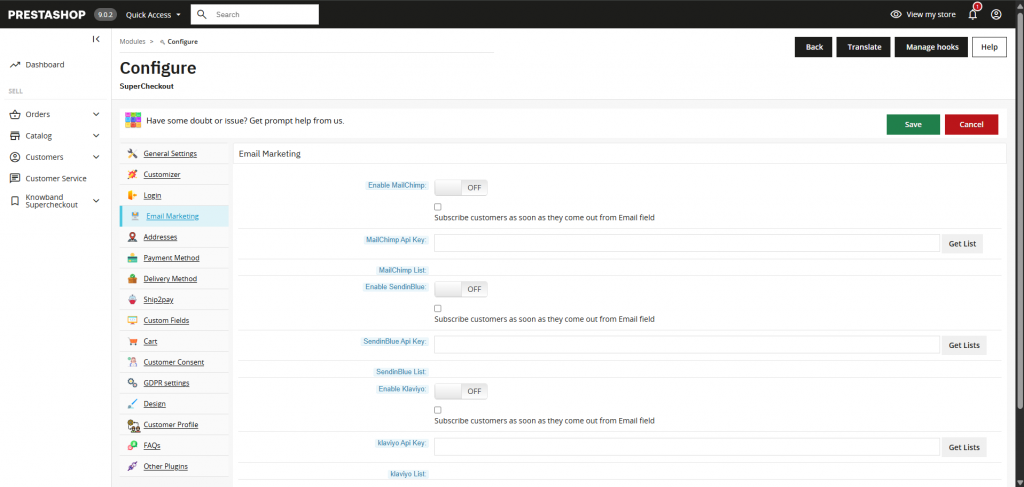
3.2 Email Marketing: Connect Checkout With Your Email Marketing
Knowband SuperCheckout can send customer data directly to Mailchimp, Klaviyo, and Sendinblue.
Depending on the setup in the module, it sends the customer data to these marketing platforms, which the store owner can then use for various types of marketing. This enhances the customer and store relationship.
3.3 Social Login: Checkout With One-Click Sign-In
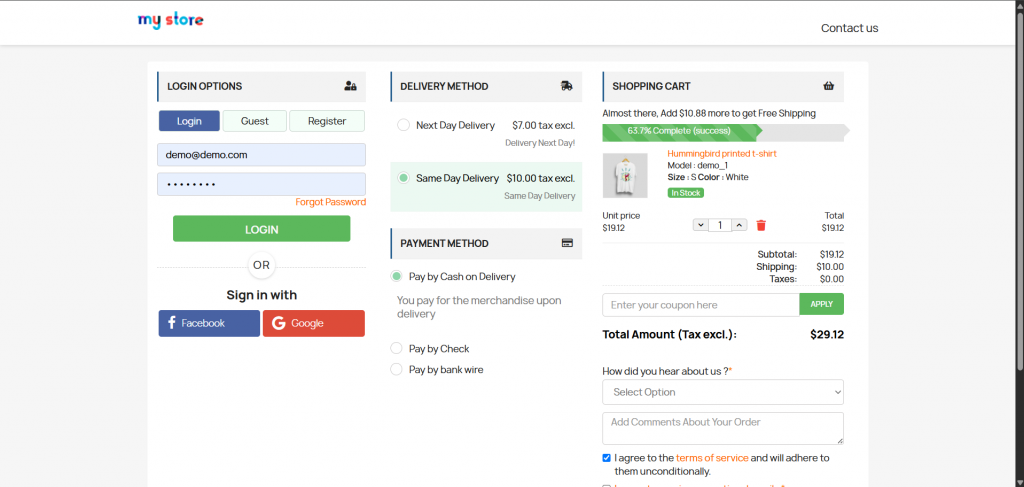
Customers can simply sign in using their social account and continue with the checkout. Facebook, Google, and PayPal login let a customer finish checkout with an account they already have.
Fewer steps, and no need to remember the password or login details just to buy a pair of shoes.
3.4 Guest Checkout: Skip the Signup and Keep the Customer Record
Guest Checkout lets a first‑time buyer place an order without having to register.
Knowband SuperCheckout’s “Register Guest” option creates the account in the background anyway. There is still a proper customer record for support and follow-up without making the shopper sit through a signup form first.
3.5 Abandoned Cart Analytics: Understand Where Customers Drop Off
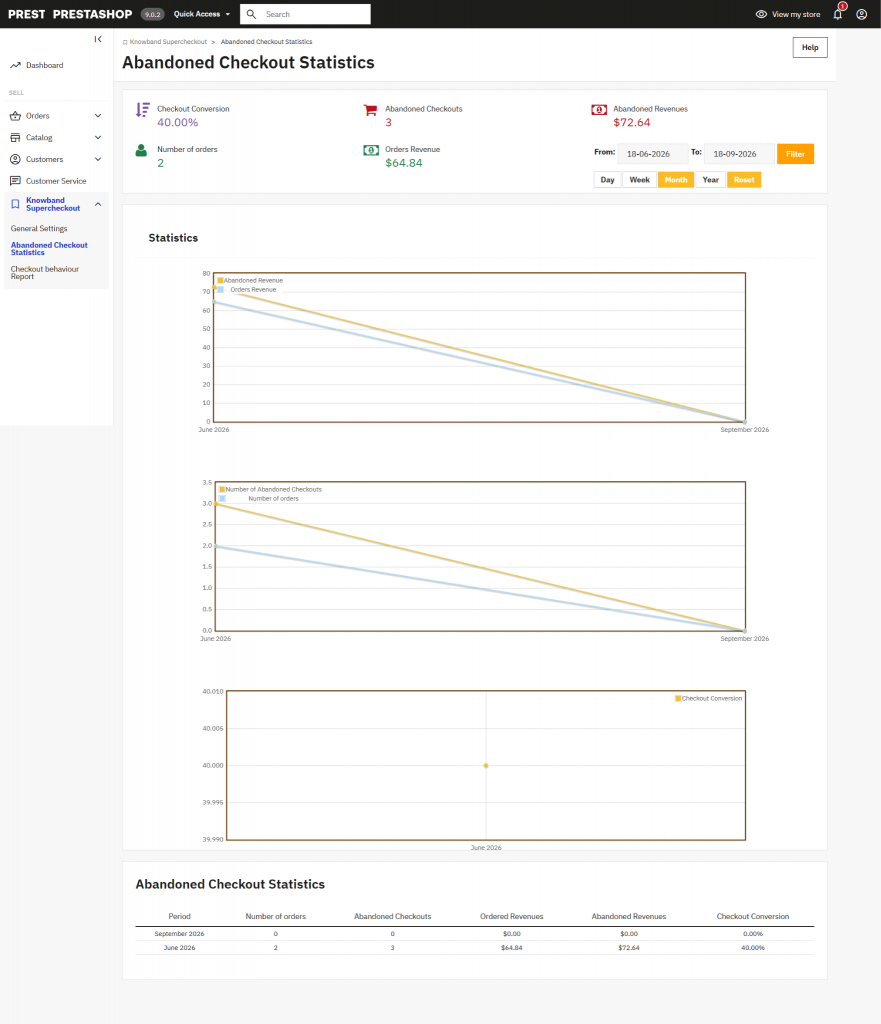
This is more than a running tally of abandoned carts. SuperCheckout tracks which fields a shopper filled in before leaving (email, address, shipping method, payment method), alongside cart value and conversion data over time.
Instead of “conversion dropped last month” staying a mystery, you can see roughly where people got stuck and go fix that specific thing.
3.5 Address Autofill: Make Address Entry Easier
Typing a full address on a phone is nobody’s favourite part of checkout.
Google Places autocomplete lets a customer pick their address from a suggestion instead of typing every line, and IP-based country detection preselects their country before they’ve typed anything. Less typing, fewer typos, fewer failed deliveries.
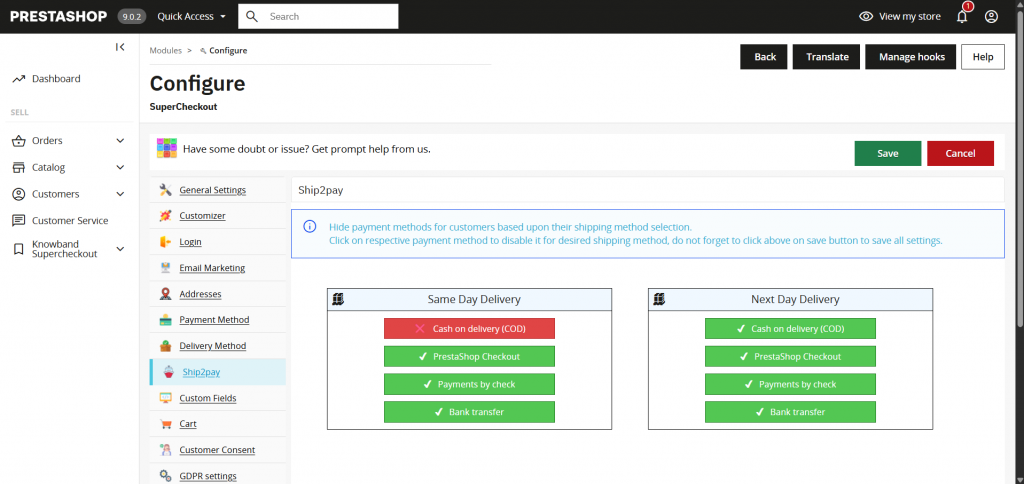
3.6 Ship2Pay: Control Payment Methods Based on Shipping
Ship2Pay ties specific payment methods to specific shipping options. Cash on Delivery, for instance, can be limited to only the carriers that support it in that region.
Without it, a customer can pick a combination that’s guaranteed to fail, which can lead to returned/refund order.
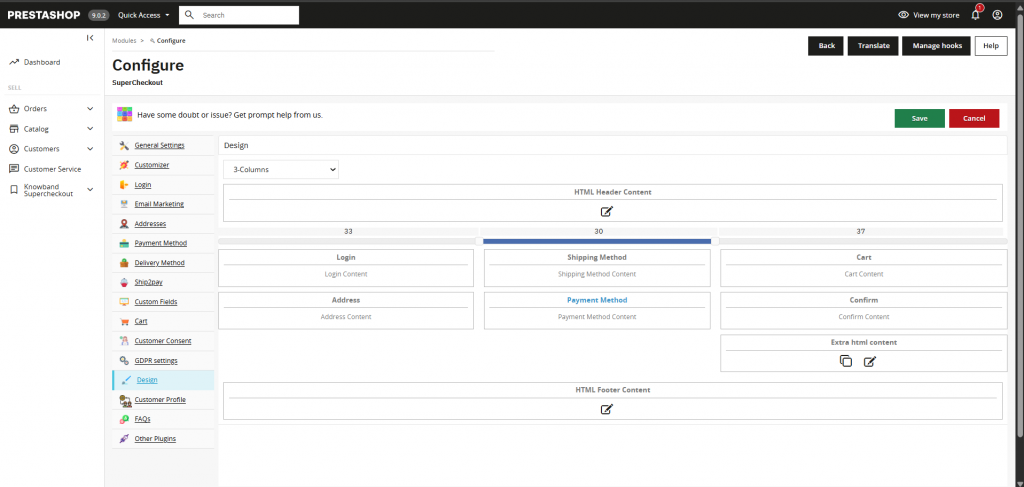
3.7 Layout Customisation: Configure the Checkout Around Your Store
Every store’s checkout needs are a little different. SuperCheckout lets you drag fields and columns around from the back office instead of editing a template, plus drop in custom CSS or JS for finer control.
If your checkout still looks like the module’s factory defaults, this is how you fix that without opening a developer ticket.
3.8 Spain Compliance: Validate Tax Identification Details at Checkout
If you sell into Spain, an invalid CIF, DNI, or NIF on an invoice is a headache waiting to happen, usually discovered by an accountant weeks later.
SuperCheckout validates these at checkout, catching the bad number before the order ships, not after.
4.0 Live Demonstration of PrestaShop One Page Checkout for 9
Reading about a checkout is one thing; watching it is another. These two recordings show PrestaShop One Page Checkout and Knowband SuperCheckout side by side, so you can judge the experience yourself.
Native One Page Checkout:
Knowband Prestashop One Page Checkout – SuperCheckout:
5.0 Frequently Asked Questions
1. Do you still need a module like Knowband SuperCheckout with PrestaShop 9.2?
Not really, no. It gives PrestaShop a standardised way to build a one-page checkout. It isn’t trying to be a full checkout toolkit. Social login, guest registration, custom fields, abandoned cart analytics, Ship2Pay, address autofill, and layout customisation all still come from a module like SuperCheckout.
2. Can I run Knowband SuperCheckout on PrestaShop 9.2?
For the Beta, test it in staging first. That’s just good practice with any Beta release. Full compatibility with the final 9.2 release should be confirmed through SuperCheckout’s own release notes once that version ships.
3. Is PrestaShop One Page Checkout available now?
Yes, as part of the 9.2 Beta. Beta means exactly that: the hook contract and implementation details could still shift before the stable release.
4. Will Knowband SuperCheckout adopt the new hook and provider interface?
Not confirmed yet. Once PrestaShop 9.2 goes stable, check SuperCheckout’s changelog for what’s actually supported.
5. Conclusion
At the end of the day, PrestaShop 9.2 provides merchants a basic One Page Layout for the checkout.
For stores that need more options or customisation, a solution like Knowband SuperCheckout still has its place. Social login, custom fields, guest registration, address autofill, shipping and payment rules, analytics, layout control: none of that ships with the native module, and that’s exactly where something like SuperCheckout keeps earning its place
PrestaShop 9.2 also introduces other changes beyond checkout, including Ask AI, its built-in admin assistant. If you’re interested in how that compares with Knowband’s Smart AI Admin Assistant, you can read our separate comparison here:
Interested in Knowband Prestashop One Page Checkout? Learn more about its features, compatibility, and current options on the Knowband website.


