
Getting a PrestaShop store onto the Apple App Store sounds like a developer project, and for most merchants, that assumption is exactly why it never happens. Custom iOS development runs $30,000 to $50,000 and takes six months minimum, according to industry estimates. That figure stops most small and mid-sized merchants before they even start. But the developer requirement is not actually the barrier it used to be. The PrestaShop iOS App Maker Module by Knowband, built on Flutter, generates ready-to-publish IPA files from your existing store, no coding, no separate content management, no rebuilding what you already have. The process has more steps than most merchants expect, but none of them requires technical skills.
What the Apple App Store Actually Requires Before You Can Submit
This is the part most guides skip. Before any app can be published on the App Store, you need an active Apple Developer account. Apple charges $99 USD per year for individual or business enrollment. The account takes 24-48 hours to activate after submission, and you will need to verify your identity and, for business accounts, your legal entity.
You also need an iPhone or iPad running iOS 9 or later for testing. Apple requires that apps be tested on a real device before submission; the simulator alone is not sufficient for App Store review. If you don’t have a device available, Apple’s TestFlight program can send a test build to up to 10,000 external testers before the public release, which is useful for confirming that the mobile app works correctly across different device types.
The mobile app itself must comply with Apple’s App Store Review Guidelines, which are a set of rules around content, privacy, functionality, and metadata. Most eCommerce apps clear these guidelines without issues, but it is worth reviewing the privacy data requirements and confirming your app’s privacy policy is accessible from the App Store listing.
How a Mobile App for PrestaShop Generates the IPA File
The standard Flutter iOS build process requires Xcode, a Mac computer, and developer certificates, none of which a typical PrestaShop merchant has. A no-code app builder for PrestaShop removes this entirely by handling the build on the developer’s infrastructure and delivering the finished IPA file to you.
The Knowband’s PrestaShop iOS App Maker works in three stages. First, install the module on your PrestaShop store and configure the admin settings, logo, theme colour, home screen layout, enabled payment methods and push notification preferences. Second, submit your mobile app specifications through a prerequisites form, including your Apple Developer account details and any branding requirements.
The IPA file is a complete, ready-to-submit iOS application. Your products, categories, payment methods, shipping options, and active coupons are automatically updated from your live store to the mobile app. Thus, nothing is rebuilt from scratch. Real-time sync means that after the mobile app goes live, any changes made in your admin panel of the PrestaShop Mobile App, such as new products, price updates, and stock changes, are reflected in the mobile app immediately.
How to Submit the IPA to the Apple App Store
Once you have your IPA file and an active Apple Developer account, you can submit through App Store Connect, Apple’s portal for managing app submissions and listings.
Here is the sequence:
- Log in to App Store Connect and create a new mobile app record
- Fill in the metadata: app name, description, category, keywords, and screenshots
- Upload your IPA file using Xcode or Apple’s Transporter tool (Transporter is available for free on Mac and Windows)
- Set pricing, most store apps are free to download
- Submit for App Store Review
Apple’s review process typically takes 24-48 hours for standard submissions. If reviewers request changes, you will receive specific feedback through App Store Connect and can resubmit. Most first-time eCommerce mobile app submissions are approved within a week.
Screenshots are worth spending time on. Apple requires screenshots in specific dimensions for each device type (iPhone, iPad), and they appear directly on your App Store listing. High-quality screenshots showing your home screen, product pages, and checkout significantly affect download rates.
What the App Includes That Your Mobile Website Cannot Offer
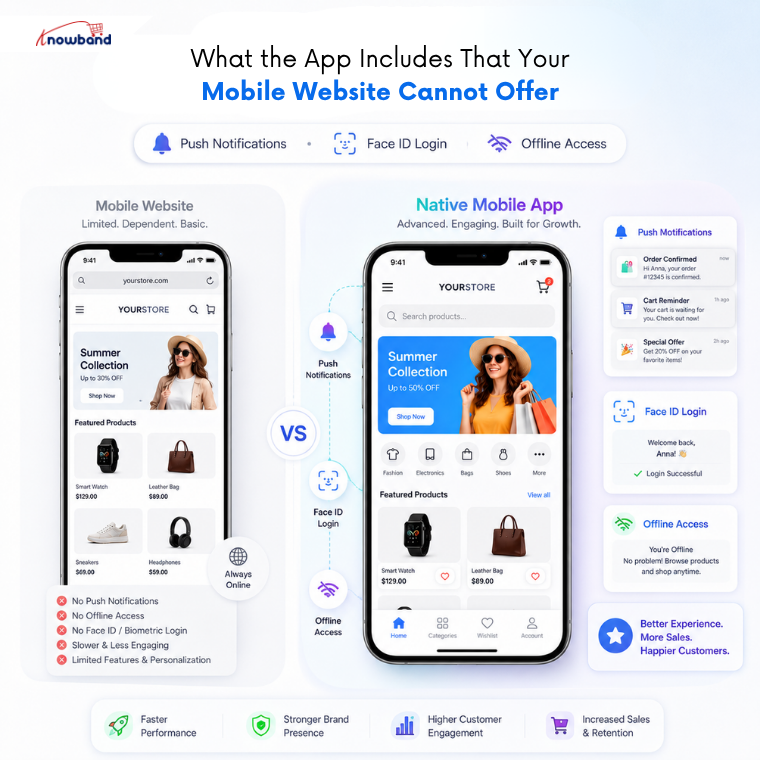
The question merchants often ask is whether a well-optimized mobile website is good enough. For many purposes, it is, but three capabilities are structurally impossible on a mobile browser and only available through a native app.
Push notifications are the most commercially significant. Mobile shopping is expected to make up 75% of all online sales by 2025, and push notifications remain one of the highest-engagement marketing channels available to mobile retailers. The Knowband PrestaShop Mobile App handles both automated notifications, order confirmations, delivery status updates, abandoned cart reminders, and manual broadcasts for promotions and flash sales. None of this is possible through a responsive website.
Fingerprint login and Face ID authentication are the second. Customers who can log in with one tap return and purchase more frequently than those who have to enter credentials each time.
The third is offline mode accessibility; product pages and categories viewed during an active session remain browsable without connectivity, which matters for shoppers in variable signal areas.
The Apple-Specific Considerations Most Merchants Miss
iOS imposes stricter privacy requirements than Android. Since iOS 14.5, apps must show Apple’s App Tracking Transparency prompt before tracking user behaviour across other apps and websites. For a standard eCommerce mobile app that only tracks behaviour within its own session, this typically does not apply, but if you plan to integrate with advertising platforms, it needs to be considered at the configuration stage.
Apple also requires that mobile apps with in-app purchases use Apple’s payment system and give Apple a percentage of revenue. For a standard eCommerce mobile app where purchases happen within the app via your PrestaShop payment methods, PayPal, Stripe, Apple Pay, and others, this does not apply. The distinction is between purchasing physical or digital goods (exempt) and in-app purchases for digital content (subject to Apple’s cut).
Your mobile app metadata, particularly the description and keywords, directly affects App Store search visibility. Apple’s algorithm weighs your title and keyword field heavily. Using “buy [product category]” and “shop [product category]” phrasing in keywords captures the search terms your potential customers are already using.
How the PrestaShop iOS App Maker Handles Post-Launch Updates
After approval, your mobile app goes live on the App Store within 24 hours of release confirmation. From that point, the admin panel of the Knowband PrestaShop iOS App Maker becomes your primary tool for managing the mobile app experience. Home screen layouts can be updated at any time using the drag-and-drop editor, useful for seasonal campaigns, sale periods, or new collection launches, without requiring a new App Store submission.
App updates that change functionality do require resubmission and re-review, but design and content changes made through the admin panel reflect immediately without going through Apple’s review process again.
For merchants ready to skip the developer cost and get their store onto Apple’s platform, the Mobile App for PrestaShop by Knowband delivers the IPA file, handles the Flutter build, and provides support for the App Store submission process, covering the technical side so the merchant’s time goes into the listing setup and launch rather than the build.
For more such reads, you can visit:


