
Most of the time when somebody rings me about their PrestaShop store, they already know roughly what’s broken. Checkout is erroring. A product page takes nine seconds. An order went missing somewhere. Annoying, but fine, because the storefront tells you where to look.
It’s the other sort of call I think about afterwards, where nothing appears wrong. Sales ticking over, back office quiet, nobody complaining. Then you open three text files nobody has touched since PrestaShop the store was built, and a good chunk of the catalogue turns out to have never surfaced in Google. Not ranked badly. Never surfaced.
Those files are sitemap.xml, robots.txt, and, more recently, llms.txt. No shopper will ever see them. A search engine looks at these before almost anything else. A search engine looks at almost nothing else first. Which is why I wanted to write this: a store can be in genuinely good health as far as customers are concerned, and half-invisible to search engines on the same day.
You don’t need to be technical to check. You need to know the files are there.
What Are Sitemap.xml, Robots.txt, and llms.txt in PrestaShop
Picture somebody who has never been in your shop. Ten minutes, maybe less, then they’re off. That’s the situation.
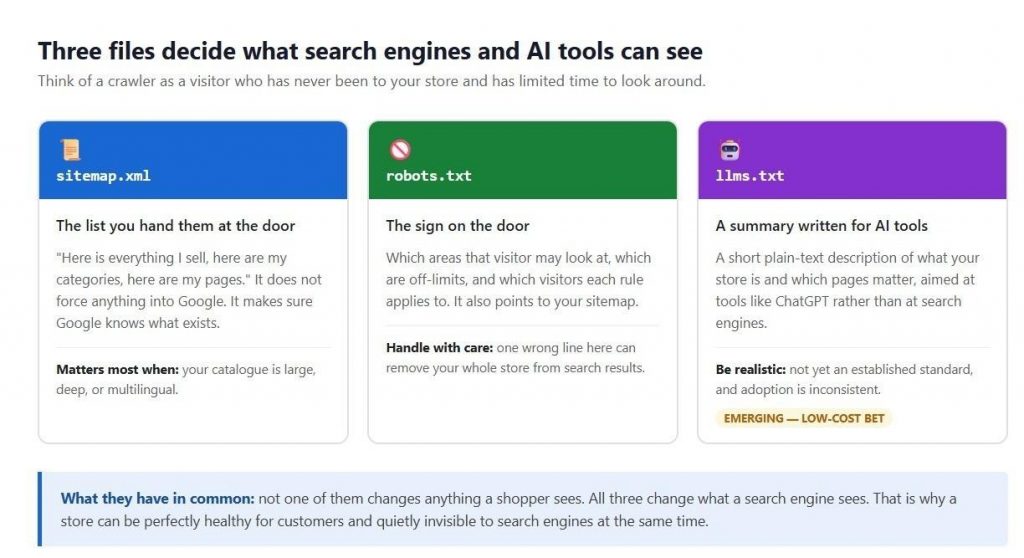
sitemap.xml: the list of PrestaShop pages you want indexed
This is the inventory where every PrestaShop page you’d like found, in one place. A sitemap has never forced a page into Google’s index. The useful bit is that it takes away the guesswork about what exists.
There are limits, and larger PrestaShop catalogues run into them. The sitemaps.org protocol caps one file at 50,000 URLs and 50MB uncompressed, which is why bigger stores split theirs across several files.
If the spec itself is heavy going, Google’s guide to building a sitemap covers the same ground more gently.
What does robots.txt do in PrestaShop
This is where the rules live. Which parts of the shop visitors may wander into, which are closed, and where the page list is. PrestaShop generates a reasonable default, but sit down with Google’s robots.txt specification once, properly, because the syntax is fussier than people assume and a reasonable-looking rule can be doing nothing.
What Is llms.txt and does PrestaShop Need It?
Much newer, this one. Aimed at ChatGPT and that crowd, not Google. Inside goes a short summary: what your store is, which pages matter. How much weight to put on it is a longer conversation, and there’s a fair bit of nonsense talked about it.
Why does this weigh more heavily on PrestaShop than a ten-page brochure site? Because your store isn’t ten pages, is it? A few thousand products, categories nested three or four deep, CMS pages, brands, suppliers. Add a language, and it all exists twice, on separate addresses. And not one of these files updates itself when you change something.
PrestaShop’s own blog has a broader piece on SEO for ecommerce if you want the strategic view. What follows here is the file-level detail underneath it.
PrestaShop sitemap.xml problems that go unnoticed
Nearly every time, the story is the same: something changed on the PrestaShop install, and these files didn’t come with it. Somebody swapped a module out. The domain moved. HTTPS got switched on, a language added, or somebody clicked regenerate one afternoon. Meanwhile, the shop serves customers exactly as before, which is why nobody thinks to look.
Module changes, HTTPS switches and domain migrations
Somebody mentions they’ve changed PrestaShop sitemap modules? Then robots.txt is where I go first, to see whether it still points at whatever file the store generates now. I’ve lost count of the times the new module was doing its job perfectly well while robots.txt sent crawlers to an address that stopped existing weeks before.
HTTPS migrations throw up the same problem. Storefront redirects as it should, padlock’s there, and the sitemap still hands out http:// addresses. With domain moves it’s sneakier. Parent gets updated, somebody ticks it off, and one child sits there with the old hostname. Either way, same treatment: correct the file, then go and open it rather than assuming.
Sitemap index files and their child sitemaps
This is where I refuse to stop at a 200 response, and I’d encourage equal stubbornness. On a larger PrestaShop store the sitemap you’ve opened is often only an index, a parent listing smaller files. So I follow every reference and test each child separately. A CMS or language file can be erroring into the void while the parent looks the picture of health.
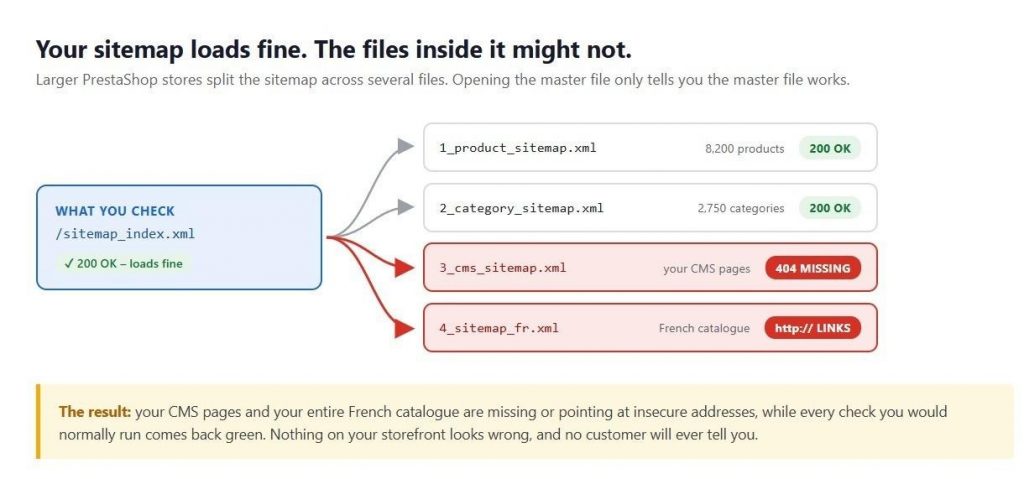
The master returns 200 OK, so every normal check comes back green. Two of its four children are broken.
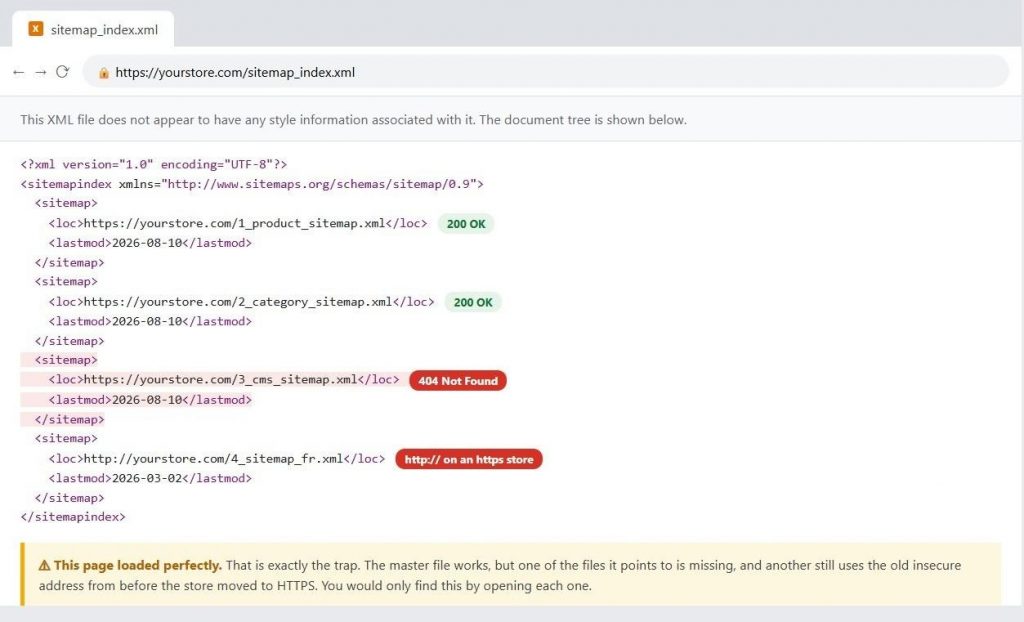
The page loads perfectly. The problems are in the addresses listed.
Missing categories, CMS pages and languages
I’ve opened sitemaps listing every last product and not one category. Others have no CMS pages whatsoever. Multilingual stores publishing the default language and nothing else. Trace them back, and you land in the same place: a module setting that made sense at two hundred products, which nobody has looked at since.
For a wider view of how sitemaps and robots.txt fit into technical SEO work, FME’s write-up on mastering technical SEO for PrestaShop covers the same territory from a different angle.
Fix robots.txt blocking Google before it costs you traffic
Of the three, this does damage fastest. One line. That’s all it takes to pull a store out of search results, and the storefront carries on looking untouched while it happens. No error message, no warning, and nothing sitting in the back office that you’d spot on an ordinary Tuesday morning.
A robots.txt that looks normal. Two lines in it do nothing.
How Do You Check if robots.txt Is Blocking Google
People see a Sitemap: line sitting there and take it as read. Don’t. Copy the URL out, open it. If it errors, I want two things: where that address came from, and how it squares with what the store generates now.
Then go hunting for Disallow: / underneath User-agent: *. One line, and every crawler is out. Turn that up when nobody in the room was expecting it and everything else on your list can wait. I won’t delete it on the spot, mind you. Why is it there? Somebody had a reason, possibly a bad one. And before committing to anything, give Google’s robots.txt testing tool a few minutes of your time.
Confirm the rules are written correctly
Blocked paths want a leading forward slash. Write Disallow: cart without one and the line is invalid, so it blocks nothing. There are merchants convinced they’ve closed off a section when they’ve done nothing of the kind.
While you’re in there, check you aren’t blocking your own design files. Google draws a page much the way a browser does, so it wants the CSS and the JavaScript. Block those folders and what it gets is a broken version of your shop. Nine times out of ten the culprit is a blanket rule across the PrestaShop modules folder.
Know which crawlers can reach you
One file, and inside it Google can be under one set of rules, Bing another, and the crawlers behind ChatGPT, Claude and Perplexity something else again. Get four or five of those stacked up on a PrestaShop install and keeping track becomes its own small problem. For reference material, Google publishes a full list of its crawlers worth keeping to hand.
Something a fair few SEO tools get wrong: blocking a crawler is not automatically a mistake. I work with PrestaShop merchants who shut AI tools out on purpose, with sound commercial reasons. If you want to know exactly what you’d be turning away, OpenAI documents GPTBot on a page of its own. What matters is knowing, as fact rather than assumption, who can reach your store.
The PrestaShop robots.txt configuration mistakes
Keep an eye on that Generate robots.txt action under PrestaShop’s SEO & URLs. It overwrites the file wholesale, so a robots.txt somebody spent an afternoon on vanishes in the middle of routine housekeeping. Copy first, then. And afterwards, pull the live file down and see whether the rules you cared about survived.
PrestaShop llms.txt: what it is, and what not to expect
llms.txt is a proposal, not a rule, and hold onto that distinction. It amounts to a short plain-text file at your PrestaShop site root: what your store is, which pages are worth reading, written for AI tools rather than search engines. Why bother? Because more product research now starts with somebody asking an assistant instead of a search box.
Right, now the part I’d hold anyone selling you this to. llms.txt is not settled in the way sitemaps and robots.txt are settled. Some AI companies read it, some don’t, and none of them, so far as I can find, publish any promise about acting on what’s in there. Somebody offering you AI traffic in exchange for the file, then, is making it up as they go. Cheap to publish, though, and it might matter later. A bet rather than a tactic.
How to Check Robots.txt, LLMs.txt and Sitemap.xml
Open these files yourself first. There’s a checklist below to guide you, but finding the correct URLs can be half the challenge. PrestaShop modules may use different sitemap URLs, PrestaShop’s built-in sitemap may not always have a .xml extension, and multilingual stores can serve different sitemap or file URLs for each language.
We developed a module for this, the Sitemap / robots.txt / llms.txt Checker, to answer the awkward questions rather than hand anybody another score out of a hundred:
• My sitemap: where is it, and did anything find it at all?
• Do the files load? All of them, including whatever sits inside the main one?
• What is robots.txt blocking, and who can still get through?
• And out of that lot, what actually needs fixing?
There’s ChatGPT in there too, drafting llms.txt or robots.txt content, walking you through your existing robots.txt in plain English, checking a change over before it saves. Backing up either way. One design decision worth mentioning, because it explains the behaviour: it reads your sitemap files, not the pages inside them. Fifty thousand products, five hundred, makes no odds.
A PrestaShop SEO checklist you can run yourself
Nothing to install, and it works on any PrestaShop version. Swap in your domain and work down. If you want the broader picture afterwards, PrestaShop’s own SEO checklist goes well beyond these three files.
In a browser, yourself:
1. Open https://yourstore.com/robots.txt and read every line. It’s short.
2. Find the Sitemap: line, open it, confirm it loads.
3. If it points to other sitemap files, open those too.
4. Check the addresses inside are complete, on your domain, https://.
5. Confirm products, categories, CMS pages and each language are represented.
6. Look for Disallow: / under User-agent: *. If nobody meant it, that’s an emergency.
7. Check every Disallow line starts with a forward slash.
8. Open https://yourstore.com/llms.txt and see if anything is there.
Worth sending to your developer:
9. Confirm image, theme and module files aren’t blocked.
10. Work out whether you want AI tools reading your store, and make robots.txt say so.
11. Re-run this after any migration, domain change, HTTPS switch or module change.
The bottom line
Take that last item if you take nothing else. These files don’t go wrong because somebody was careless. They go wrong because the store moved on and one crawler-facing file got left where it was. The repair, once found, is usually small. It’s the finding that takes discipline.
And it’s easy to miss because there are no symptoms worth the name. Nothing crashes when a sitemap breaks. Shut half your catalogue out through robots.txt, and you won’t lose an order that day. So make it a habit: something significant changes, you go and open those three files. Not because you expect to find anything alarming, mind. You’re after the small mismatch, the one nobody would notice. Find that, fix it, and you know what crawlers are getting is what you meant to serve them.
This was around the technical SEO and AI Search visibility of your prestashop. For any queries, customisation, or doubts, reach out to us at [email protected].


