
Active, in stock, sitting right there in your catalogue. Yet a customer typing its exact name gets nothing back. Nothing is corrupt: the product is simply not in the search index, and storefront search never touches your product table at all.
Most cases of PrestaShop product search not working come down to that one fact. Instead of reading your catalogue, PrestaShop reads two dedicated index tables that were populated at some earlier point, so a product absent from them is invisible. Correct data in the back office changes nothing.
Before checking anything else, check whether indexing itself is enabled. PS_SEARCH_INDEXATION controls whether PrestaShop automatically updates the search index when supported product changes occur. If it is disabled, saving a product will not reliably refresh its searchable terms, and changing visibility, weights, or aliases will not fix a product that never reaches the index. Turn indexing back on before working through the rest of the troubleshooting steps, or make sure you have a manual or scheduled indexing process in place.
Below, we trace how indexing really works, why products go missing from it, and which settings are worth changing. Everything here was checked against the 8.2.6 and 9.1 source rather than taken from the settings screen.
1.0 How does PrestaShop indexing work?
Every product becomes a list of words with scores attached, and two tables hold the result. That, in essence, is PrestaShop indexing.
- Every distinct indexed word lives in ps_search_word, per language and per shop. The table schema uses a varchar(30) column for the stored word, but that storage length should not be confused with every limit applied during search processing. Tokenisation and fuzzy matching have their own rules, so a long SKU or product term can behave differently depending on how it is being searched.
- Linking word to product is ps_search_index. It carries the weight, keyed on word plus product.
Given a query, PrestaShop looks its words up in the first table, collects product IDs and weights from the second, then ranks by total weight. Only afterwards is ps_product read. It supplies display data for products the index already picked.
Multiple words narrow the results rather than widening them. Search for red cotton shirt and only products carrying all three words survive, because PrestaShop intersects the matches word by word. Semicolons behave the opposite way: red;shirt returns products matching either term. Neither rule appears anywhere in the back office. The first one explains a good number of complaints about too few results.
Language and shop are part of the key here, not an afterthought. Every shop in a multistore setup keeps its own index, and every language keeps its own set of indexed words. That makes shop context important whenever you rebuild the index.
Multistore warning: be explicit about which shop context is being used before running a rebuild or calling the indexing cron URL. Do not assume that an indexing request without a clearly specified shop is limited to the storefront you intended. Depending on how the request is executed, the operation can affect indexing more broadly than expected. Always verify the shop context first, particularly on a production multistore installation.
Relevance comes from weight. Each indexed field carries its own configurable score, and these are the shipped defaults:
| Field | Configuration key | Default weight |
| Product reference, supplier reference, combination reference, EAN, ISBN, UPC, MPN | PS_SEARCH_WEIGHT_REF | 10 |
| Product name | PS_SEARCH_WEIGHT_PNAME | 6 |
| Tags | PS_SEARCH_WEIGHT_TAG | 4 |
| Category and manufacturer name | PS_SEARCH_WEIGHT_CNAME / MNAME | 3 |
| Attributes and features | PS_SEARCH_WEIGHT_ATTRIBUTE / FEATURE | 2 |
| Short description and description | PS_SEARCH_WEIGHT_SHORTDESC / DESC | 1 |
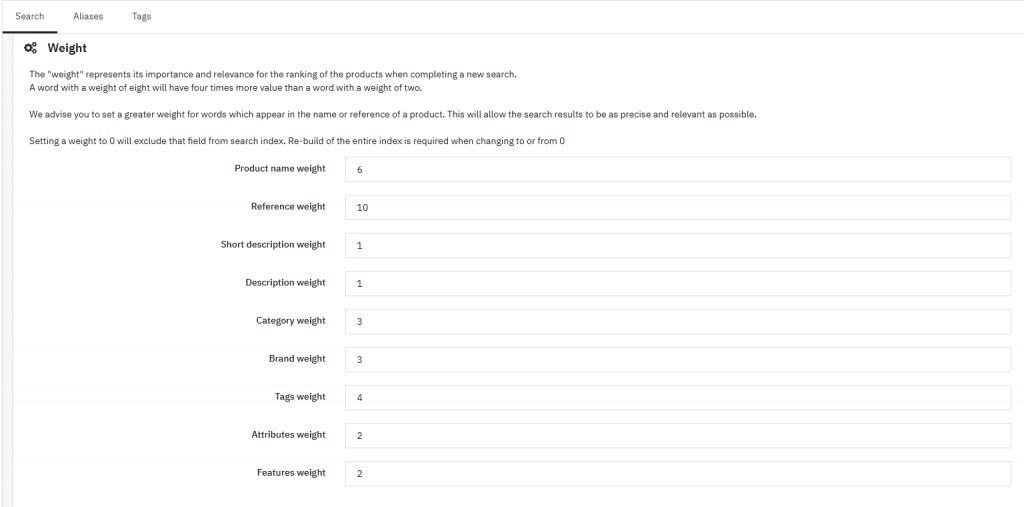
Look at the top row. A reference match scores nearly twice a name match and ten times a description match. That is deliberate: someone typing a product code usually wants a specific item rather than a broadly related product.
Reference matching is broader than the main product SKU alone. The same weighting also matters for supplier references and combination references, which is particularly useful for stores selling products with multiple variants. A customer searching for a variant-specific SKU can therefore reach the parent product through the reference data associated with that combination.
Ratios matter here rather than the numbers themselves. As PrestaShop’s documentation puts it, an item weighted 8 counts four times one weighted 2.
1.1 When does reindexing happen?
Automatically, but not after every catalogue change. In PrestaShop 9, saving a product through a supported update path can trigger indexing for the product fields handled by that path. Webservice writes, product duplication, deletion, theme installation and shop creation can also reach the indexing routine.
The important distinction is between changing the product itself and changing data attached to it. Updating a product name, description, or another directly indexed product field can refresh that product’s search entry. Changes to categories, manufacturers or features do not necessarily trigger a reindex of every product affected by those changes. The searchable data may therefore change while the index still contains the old words.
The same problem appears after direct database imports, bulk operations, and third-party code that bypasses the normal indexing path. When in doubt, do not assume a Save button updated the search index. Run an incremental or full rebuild depending on how widely the catalogue changed. The developer documentation lists every trigger. Anything outside that list leaves you rebuilding by hand.
2.0 Why is PrestaShop search not showing all products?
Read the indexing query and the answer is usually sitting in it. Only products meeting two conditions at once get indexed:
- active = 1. Disabled products never enter the index.
- visibility set to both or search. Anything marked Catalogue only is excluded by design, and that is the one everybody forgets.
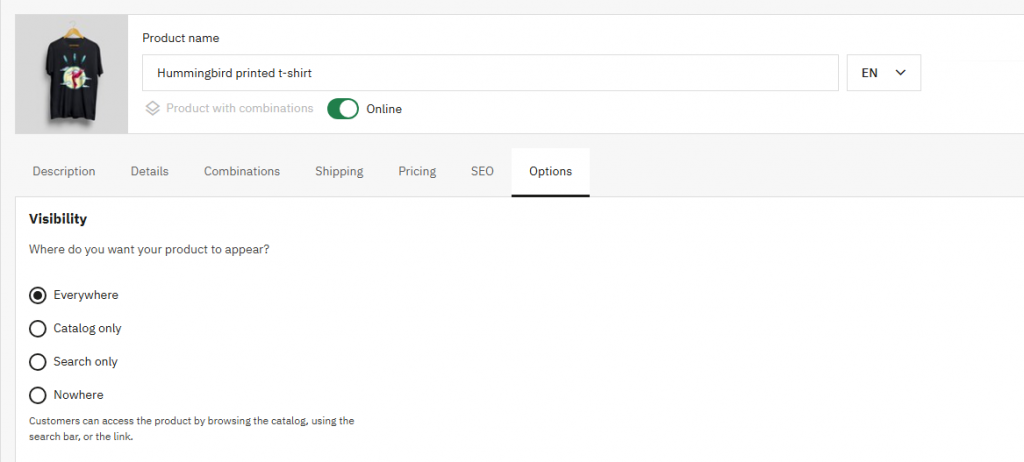
When a product will not come up, check that visibility field first. It sits under the product’s Options tab, an import can set it by accident, and nothing on the product page warns you that search is affected.
A third condition governs the everyday index run. Each product carries an indexed flag. The routine rebuild only processes rows where that flag still sits at 0, which means already-indexed products get skipped even when their content changed since. Hence an edited product that keeps returning old results.
2.1 How to rebuild the PrestaShop product index
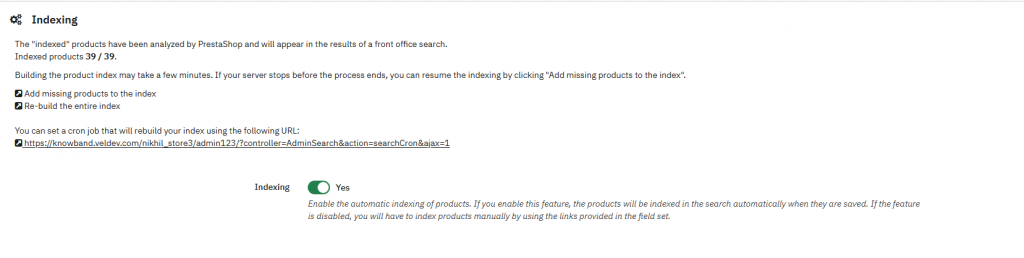
Two buttons live under Shop Parameters → Search, and they do quite different things.
Running incrementally, *Add missing products to the index* picks up products whose indexed flag is 0 and leaves the rest alone. Fast, and safe to run often.
*Re-build entire index* clears both tables and starts over. Slower, and the right choice after bulk edits, an import, or any change to your search weights. That last case surprises people. Weights are written into the index while indexing runs, not applied at query time, so changing them does nothing until you rebuild.
On a large catalogue, a PrestaShop search index rebuild takes real time, so run it during a quiet period rather than mid-morning.
2.2 What is the PrestaShop search index cron job?
Ordinary URLs sit behind both buttons. That is what makes automation possible. They point at the AdminSearch controller with action=searchCron&ajax=1 plus a token, and adding full=1 switches the incremental run for a full rebuild.
Copy the URL from that settings page rather than assembling one. Tokens are generated per shop, so a hand-built one gets rejected. In a multistore setup, generate and run the URL from the intended shop context rather than assuming one cron URL safely represents every storefront. Then call it from cron on whatever schedule suits your catalogue: nightly full rebuilds where imports are frequent, the incremental version more often where the catalogue changes gradually.
3.0 Why does PrestaShop search return irrelevant results?
Usually because of two settings that behave less obviously than they look.
3.1 Minimum word length
Defaulting to 3, PS_SEARCH_MINWORDLEN drops shorter words at both ends: they never enter the index, and they are stripped out of queries too. Sell anything whose name hangs on a short token and this bites immediately. Model numbers, sizes such as XS, two-letter brand names.
Lowering it to 2 is perfectly reasonable when your catalogue needs it, provided you rebuild afterwards. The existing index was built under the old rule and will not update itself.
Accents, at least, need no attention. Indexing strips them from every word before storage, and queries go through the same treatment, so *café* and *cafe* reach the same products either way. The same applies to any accented character your catalogue uses.
3.2 Fuzzy search
On by default, fuzzy matching lets a misspelling still find the product it was aiming at. It works by measuring Levenshtein distance, the number of single-character edits separating two words, which is how a customer typing *ummingbird* still reaches *hummingbird*.
Precision loosens as a result. Every fuzzy match is a word the customer did not type, and on a catalogue full of similar names the results start drifting. Two settings control the cost: how many approximate words a query may use, and the maximum word length considered. In PrestaShop 9, fuzzy matching does not treat arbitrarily long terms the same way as ordinary indexed terms. The default maximum word length considered for fuzzy matching is 15 characters, which matters when troubleshooting long SKUs, model numbers or unusually long product names. A long term may therefore be present in the search data but still not receive fuzzy matching treatment.
3.3 Two settings that decide how words are matched
Sitting on the same Search screen, and easily missed, are two switches that change matching more directly than anything else there.
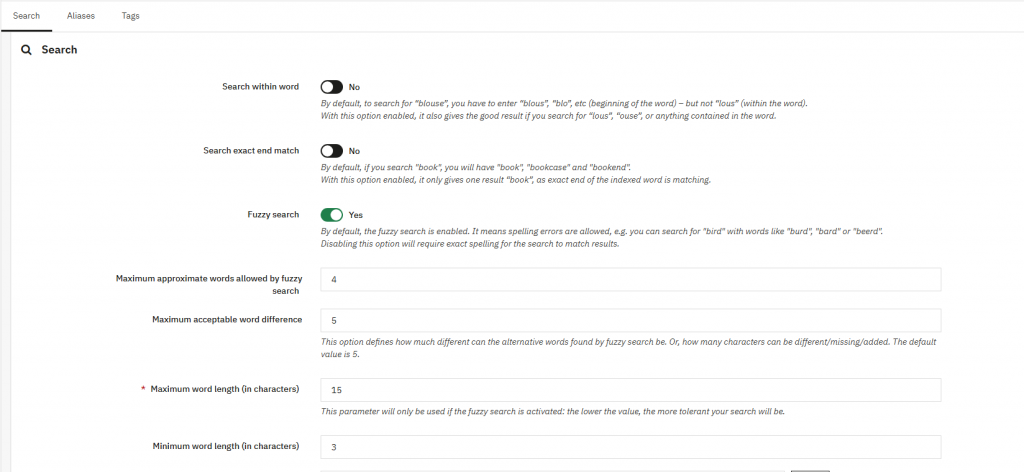
Search within word is off by default, which means a query matches only from the start of an indexed word. PrestaShop’s own description gives the example: searching *blous* or *blo* finds *blouse*, but *lous* does not. Turn the setting on and anything contained in the word matches. Useful for compound names, though the field’s hint warns it can be resource-consuming, since the underlying query loses the ability to use an index efficiently.
Search exact end match works the other way. Left off, searching *book* returns *book*, *bookcase* and *bookend*. Switch it on and only *book* comes back. Precision improves; discovery suffers. Most shops are better served leaving it alone.
Between them these two decide whether your search behaves as prefix matching, substring matching, or exact matching. Try them before concluding the engine cannot find your products.
3.4 Blacklisted words
Blacklisted words remove matching terms from both the index and incoming queries. It ships empty and is configured per language.
One detail matters here: the value is interpreted as a regular expression rather than a simple list of literal words. That means characters with special regex meaning can change what PrestaShop matches. A pattern that is too broad, or simply formatted incorrectly, can remove far more terms than intended and cause search problems that are difficult to trace.
Filler is what the setting is for. Catalogues whose descriptions repeatedly use words such as the, with, or for may gain little from indexing them, and excluding genuinely unhelpful terms can reduce noise. Be conservative, though. Test the pattern before relying on it, and remember that a word matched by the blacklist becomes unavailable to search. Leave alone any term that looks like filler in descriptions but carries meaning in a product name.
3.5 Aliases, the most underused setting
Under Shop Parameters → Search → Aliases sits a mapping table from wrong spellings to right ones. Enter *plaier* against *player*, and anyone typing the first reaches products indexed under the second.
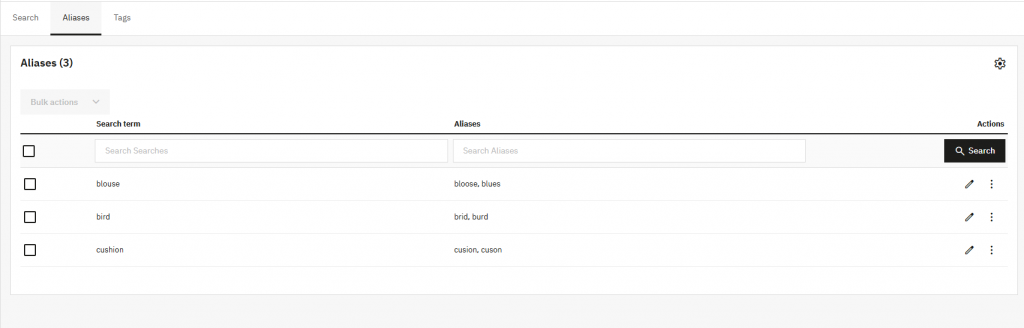
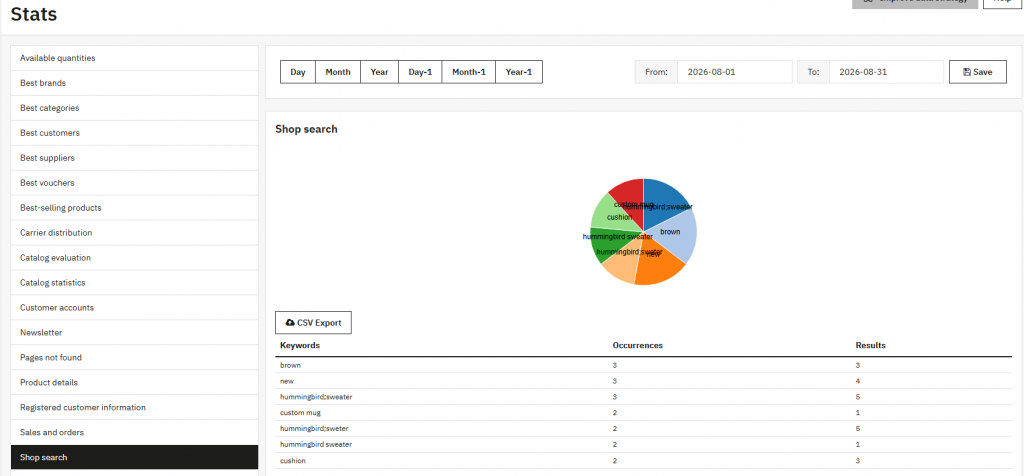
For known problems, aliases beat fuzzy search. Fuzzy matching guesses at every query and sometimes guesses wrong. An alias fires only on the exact word you listed. No cost in precision. Your search statistics page shows what customers actually mistype, which turns this from guesswork into a short list.
3.6 Checking the index yourself
When a single product refuses to appear, two quick queries settle it faster than any amount of clicking. Look the product up in ps_search_index by its ID: no rows means it was never indexed. Check the visibility setting first. Rows present but a term missing points to the minimum word length instead.
4.0 Can PrestaShop search be replaced with Elasticsearch?
Yes, through a module, and the extension point is a deliberate one rather than a workaround.
Before the built-in search runs, a productSearchProvider hook fires. Should any module answer it with an object implementing ProductSearchProviderInterface, that module takes the query over completely, and the core search is never called. That is exactly how a PrestaShop Elasticsearch module does its work.
No Elasticsearch support ships in core, so replacing the PrestaShop search engine always means a third-party PrestaShop search module plus a search server sitting behind it. Genuinely worth doing when you need typo tolerance, synonyms, stemming across several languages, or instant results across tens of thousands of products. For a few hundred, it is overkill. The built-in engine with sensible weights performs perfectly well at that size.
4.1 Does PrestaShop support faceted search by default?
It does. Bundled with both 8 and 9, ps_facetedsearch provides the filter sidebar on category and search pages: price ranges, attributes, features, brands, availability.
Keep one distinction straight here. PrestaShop faceted search filters a result set that already exists. Deciding which products the search returns in the first place is not its job. A product missing from the index stays missing, whatever your filters say.
5.0 How to improve PrestaShop search accuracy
Seven changes, in rough order of effort against payoff. Start by making sure indexing itself is running before investigating individual products or search settings.
- Check whether indexing is enabled. Confirm that PS_SEARCH_INDEXATION is enabled, or that the store has a reliable manual or scheduled indexing process. If products are not entering the index, changing relevance settings will not make them searchable.
- Fix visibility. Any product set to Catalogue only is invisible to search by design, and this accounts for more missing products than every other cause combined.
- Rebuild after bulk changes. Imports and mass edits routinely leave the index stale. The incremental run will not catch them.
- Tune the weights to your catalogue. Selling by model number? Reference already outranks everything. Selling clothing where names matter more, consider lifting the name weight and cutting the description weight, since long descriptions add noise.
- Add aliases for the misspellings you actually see. Shop Parameters → Search → Aliases maps a wrong spelling onto the right word, and the search statistics page tells you which ones your customers really type.
- Check the minimum word length against your product names before assuming the engine is broken.
- Only then consider replacing the engine.
6.0 What changed between PrestaShop 1.7 and 9?
Less than you might expect. Across 1.7, 8, and 9, the two index tables, the weight system, and the cron endpoint all behave identically. Advice written for 1.7 still largely holds.
Fuzzy search is the real difference. In PrestaShop 8, the Levenshtein cap is a hard-coded constant of 8 inside the Search class. Nothing in the back office changes it. PrestaShop 9 swaps that for a configuration value, PS_SEARCH_FUZZY_MAX_DIFFERENCE, which defaults to 5.
Two things follow from that change. Out of the box, fuzzy matching is tighter at 9, which should mean fewer loosely related results reaching your customers. And the threshold is finally adjustable, so a shop drowning in fuzzy matches now has something it can turn.
Everything else in the search path is unchanged between the two versions.
7.0 The short version
Search reads an index, not your catalogue. A product absent from that index cannot be found. Start by checking that indexing is enabled, then look at product visibility and whether the index is stale after a bulk or indirect catalogue change.
Weights get baked into the index while indexing runs, so changing them achieves nothing until you rebuild. Automate that with the cron URL from the settings page rather than relying on somebody to remember a button.
Before reaching for a replacement engine, confirm that indexing is enabled, check visibility, and run a full rebuild where the catalogue has changed outside the normal indexing path. Most searches that look broken turn out to be a stale index rather than a bad algorithm, and ruling that out costs nothing.
Thanks for reading.
If you have questions or need assistance with your website performance or migration, our experts are here to help. Contact the Knowband team at [email protected] today for reliable ecommerce plugins tailored to your eCommerce needs.


