
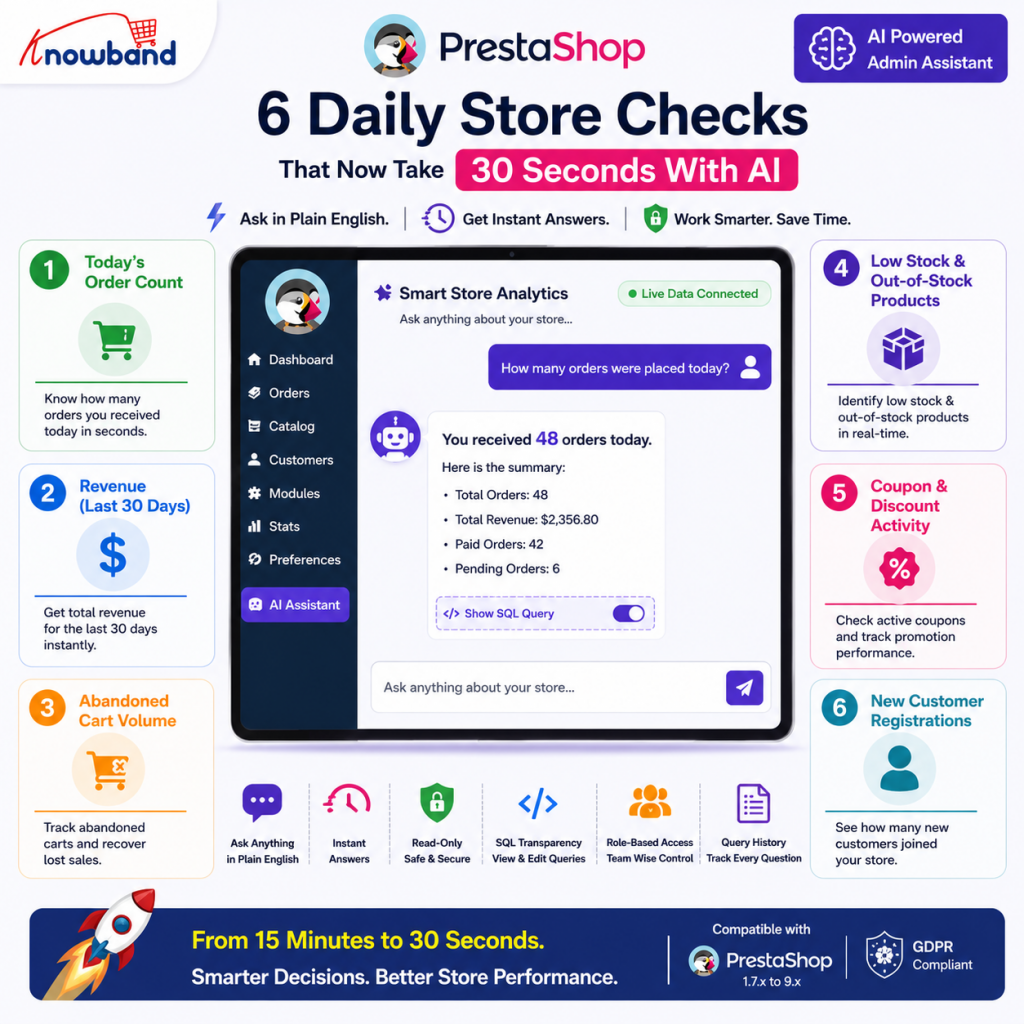
Every PrestaShop admin has a version of the same morning routine. Log in, click Orders, wait for the page, and read the count. Navigate somewhere else for revenue. Somewhere else again for stock. By the time three standard checks are done, a quarter of an hour has gone by, and the actual work has not started yet. The problem is not the data. PrestaShop holds everything a store needs. The problem is the number of steps required to reach it. Knowband PrestaShop admin productivity Module built on AI flips that entirely; instead of navigating to the data, you ask for it in plain language and get the answer in seconds from live store data. No filters, no report pages, no waiting.
Here are six daily checks that store admins run repeatedly, and what changes when a PrestaShop Admin Productivity Module handles them through an AI chat interface instead.
Check 1: Today’s Order Count, From 4 Clicks to One Typed Question
The most common first check of any admin’s day is how many orders came in overnight. In a standard PrestaShop back office, that means navigating to Orders, waiting for the page to load, checking the filter is set to today, and reading the number.
With an AI assistant sitting inside the back office, the same check becomes a typed question. “How many orders were placed today?” pulls the answer from live store data in seconds. For stores running high volumes or multiple markets, this alone removes a meaningful slice of daily friction.
The Knowband module also lets admins set this as a predefined chip, a one-click button in the chat widget that sends the question without any typing at all. The order count becomes a single tap every morning, not a navigation sequence.
Check 2: Revenue for the Last 30 Days, No Stats Section Required
Checking monthly revenue in a standard PrestaShop back office means opening the Stats section, selecting the right report type, setting the date range, and waiting for the figures to load. For admins who do this before team meetings or daily stand-ups, that process repeats itself constantly.
A plain language query to the AI assistant, “What is the total revenue for the last 30 days?”, returns the figure directly from live store data. No report generation, no date filter setup, no page refresh. The answer arrives in the same chat window used for every other check.
This is where PrestaShop Order Insights, through a conversational interface, saves the most accumulated time. Revenue checks that previously required four or five steps now take the same effort as sending a message.
Check 3: Abandoned Cart Volume, Data That Most Admins Check Irregularly
Abandoned cart data exists in every PrestaShop store. Most admins check it far less often than they should, not because it is unimportant, but because reaching it requires navigating to the right section, running the right report, and interpreting what comes back. The friction quietly pushes it down the priority list.
An AI-powered back-office workflow removes that friction entirely. “How many carts were abandoned in the last 30 days?” returns the count immediately. A follow-up question, “What is the total value of those carts?”, adds the revenue context without any additional navigation.
For stores running abandoned cart recovery campaigns, being able to check these figures as part of a 60-second morning routine rather than a dedicated reporting session means the data actually gets used. According to the Baymard Institute, the average documented online cart abandonment rate sits at nearly 70%, making this one of the most commercially significant daily checks any PrestaShop admin can run.
Check 4: Low Stock and Out-of-Stock Products, Inventory Tracking Without the Module-Hopping
Stock level monitoring across a large catalogue is one of the most time-consuming daily tasks in any PrestaShop back office. Checking which products are out of stock, which are running below a threshold, and whether any active products are missing a SKU reference all live in different places and require different navigation paths.
The AI assistant consolidates all of it into natural language. “Which active products currently have fewer than five units in stock?” returns the list immediately. “Are there any out-of-stock products still set to active?” does the same for visibility issues. Both answers come from read-only access to live inventory data, so what comes back is current, not a cached snapshot from an earlier report run.
Predefined chips make stock checks part of the standard morning sequence rather than a separate session. The default chip set in the Knowband module includes both low-stock and out-of-stock queries ready to run with a single click.
Check 5: Coupon and Discount Activity, Promotion Monitoring in Plain English
Running a promotion without tracking how it performs in real time is a common blind spot for PrestaShop merchants. Checking coupon usage, identifying which cart rules are currently active, and spotting whether any free-shipping discounts are running means navigating to Cart Rules in the back office and reading through the list manually.
The PrestaShop AI Reporting Module handles this through a typed question. “Are there any active coupons offering free shipping?” returns the answer directly. “How many times has coupon code SUMMER20 been used this month?” goes further, pulling usage data from live store records without any export or filter required.
For merchants running time-limited promotions, having that visibility available in seconds rather than minutes means issues get caught earlier. An over-performing discount or an expired coupon that is still live are both problems that surface faster when the check takes no effort to run.
Check 6: New Customer Registrations, Growth Tracking Without Running a Report
Tracking how many new customers registered in a given period is a standard growth metric for any eCommerce store. In a standard PrestaShop back office, it requires opening the Customers section, setting a date filter, and waiting for the filtered list to load, or running a separate statistics report.
A single question, “How many customers registered this month?”, returns the figure in seconds. A follow-up, “How many of those are from Germany?”, adds segmentation without any additional steps. The assistant builds the appropriate query from natural language and pulls the answer from live customer data.
This kind of PrestaShop Order Insights and customer-level visibility in one interface means admins can cover growth and transaction checks in the same session, without switching between report types or sections.
How a PrestaShop Admin Productivity Module Handles All Six Checks Together
Each of these six checks currently lives in a different part of the PrestaShop back office. Combined, running through all of them manually takes the better part of twenty minutes on a typical morning, longer when filters need adjusting or pages load slowly.
The Knowband PrestaShop Smart Admin Assistant consolidates every check into a single chat interface. All six questions above can be asked and answered in under two minutes. With predefined chips configured for the most common queries, that drops further, closer to six taps and thirty seconds.
The query history log keeps a record of every question asked, which employee asked it, and how long each response took. For stores with multiple admin staff, that audit trail keeps the daily routine accountable without any additional management overhead.
If your store is running PrestaShop 1.7.x through 9.x and your team is still navigating through reports to answer the same questions every morning, the PrestaShop AI Reporting Module is the most direct fix available, no developer required, no SQL knowledge needed, and most setups complete within a single session.
For more such reads, you can visit:

